.svg)
 Book a Demo
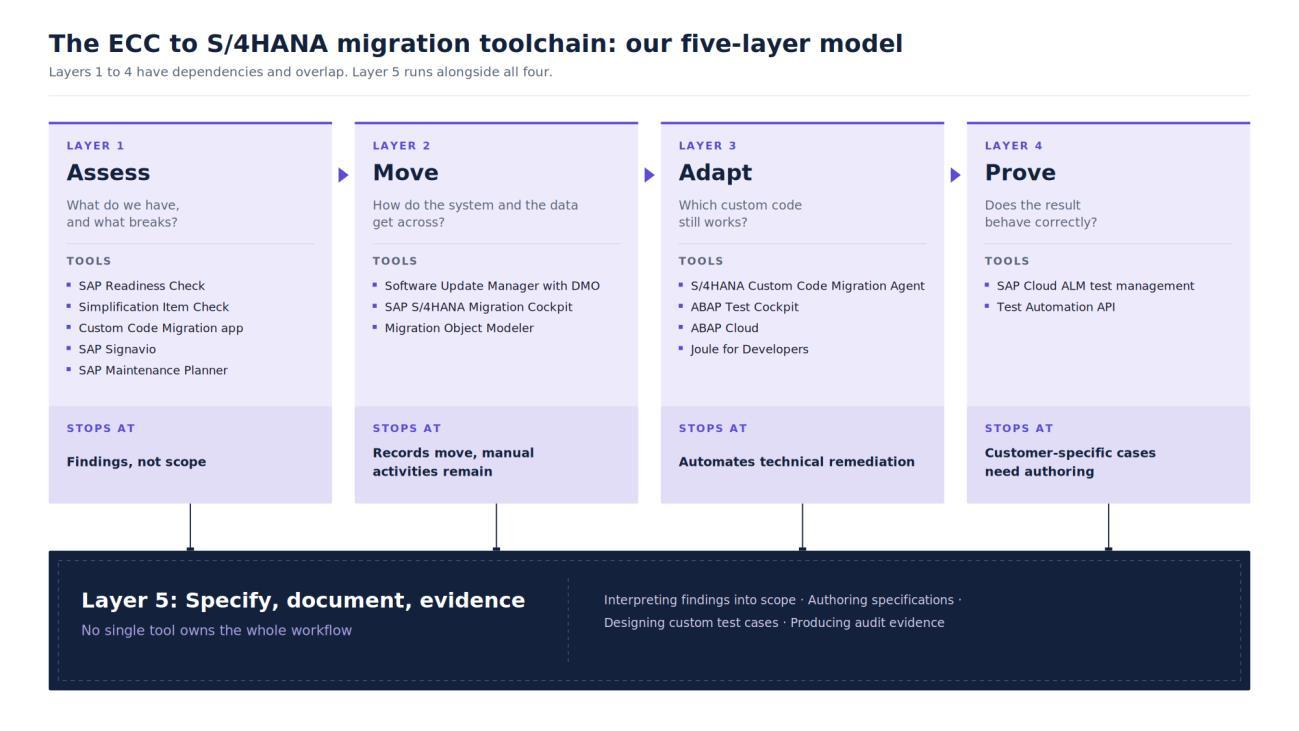
For planning purposes we map the ECC to S/4HANA toolchain into five layers: one to assess what you have, one to move the system and the data, one to adapt your custom ABAP, one to prove the result works, and a fifth for the specification, documentation and evidence that sits around all of them. The five-layer model is ours, not SAP's official terminology, and it exists because the fifth layer is where we see programmes lose weeks. It is also the layer that responds best to being planned for early, which is what this page is for. Every boundary below is drawn from SAP's own documentation.
This guide focuses primarily on ECC to S/4HANA system conversion and SAP S/4HANA Cloud Private Edition. Tool availability and migration behaviour can differ for Public Edition, on-premise deployments and selective data transitions.
With mainstream maintenance for SAP Business Suite 7 ending on 31 December 2027, knowing where the toolchain stops is what makes a wave plan survive contact with the estate.
Key Takeaways
- We map the ECC to S/4HANA toolchain into five layers: assess, move, adapt, prove, and the specification and evidence work spread across all four.
- SAP recommends collecting custom code usage data for 6 to 18 months, including at least one year-end closing, before you trust it.
- SAP positions both SAP Readiness Check and the Simplification Item Check as pre-conversion assessments, and the Simplification Item Check is the hard technical gate.
- Standard test content imports the test procedure titles into SAP Cloud ALM, so writing the script itself stays with your team.
- Map your estate against all five layers before you commit to a wave plan, not after the go-live date is fixed.
What Tools Do You Need for an ECC to S/4HANA Migration?
Four of the five layers have tooling, and each answers a different question about your estate. The four technical layers have dependencies, but they are not a strictly linear sequence. Assessment starts first, conversion creates the S/4HANA environment that adaptation needs, and test design and preparation can run in parallel with both. The table below is the whole stack in one view, including the boundary of each layer, which is the part most toolchain guides leave out.
| Layer | The question it answers | The main SAP tools | Where the layer stops |
|---|---|---|---|
| 1. Assess | What do we have, and what breaks? | SAP Readiness Check, Simplification Item Check, Custom Code Migration app, SAP Signavio, SAP Maintenance Planner | Produces findings, and hands scope to people |
| 2. Move | How do the system and the data get across? | Software Update Manager with DMO, SAP S/4HANA Migration Cockpit, Migration Object Modeler | Moves records, and defines the manual follow-on activities |
| 3. Adapt | Which custom code still works? | S/4HANA Custom Code Migration Agent, ABAP Test Cockpit, ABAP Cloud, Joule for Developers | Automates technical remediation; business intent and final acceptance still require expert review |
| 4. Prove | Does the result behave correctly? | SAP Cloud ALM test management, Test Automation API | SAP-provided standard test content does not automatically cover customer-specific process variants and custom logic; those cases must be created or adapted |
| 5. Specify, document, evidence | What was it meant to do, and can we show it? | Distributed across SAP tools; no single tool owns the complete workflow | Your team creates, interprets, reviews and approves the content |
Which Tools Assess Your ECC System Before You Convert?
Several SAP tools run against your live ECC system before any conversion begins, and they do different jobs. SAP frames the split three ways: SAP Landscape Discovery in SAP LeanIX builds an automated view of the as-is SAP landscape, SAP Signavio Process Insights gives visibility into actual ERP process usage and performance, and SAP Readiness Check identifies the simplification items where functionality is absent or behaves differently.
What Does SAP Readiness Check Tell You?
SAP Readiness Check assesses the functional and technical aspects of converting an ECC system, and returns simplification items, compatibility scope, custom code impact, add-on compatibility and SAP Fiori app recommendations. SAP describes it as "a suite of self-service tools to help you plan the next steps on your digital transformation journey".
Run it against production. SAP's wording is a recommendation rather than a requirement, but a firm one: "We highly recommend running SAP Readiness Check tools in the production system to get an accurate picture of actual system usage". A development system does not provide a reliable picture of actual production usage.
Why Is the Simplification Item Check the Real Gate?
SAP positions both as important pre-conversion assessments, and its current training material is not fully consistent on whether Readiness Check is mandatory. What is unambiguous is which one is the hard technical gate: the Simplification Item Check, whose relevant errors must be resolved before Software Update Manager can enter downtime. SAP states that the SI Check "checks for data that will cause problems during and after the SAP S/4HANA conversion", and that "The SI-Checks must be performed ... and errors must be solved ... before the Software Update Manager can enter downtime."
The data that blocks the conversion does not disappear at cutover. It is still there on the other side, still wrong.
The two checks are not substitutes. One SAP Learning module puts it directly: "While both the SAP Readiness Check and Simplification Item Check are able to display information about the Simplification Item relevance and consistency, they serve different purposes and therefore are both required before the technical conversion begins".
How Do You Identify Custom Code Nobody Uses?
Custom code scoping tells you which ABAP objects are actually called, so you can identify candidates for retirement instead of automatically adapting everything in the estate. The data comes from either the ABAP Call Monitor, transaction SCMON, or Usage and Procedure Logging, and SAP is clear that "it is discouraged to use both tools simultaneously (to minimize potential system performance issues)".
The timescale is the problem. SAP recommends "running the preferred tool for 6-18 months, which should include at least one year-end closing", and SCMON data "is deleted after a short period of time" unless you aggregate it in transaction SUSG.
So a team that has not been logging cannot get a trustworthy dead-code answer on the day it decides to migrate. It gets whatever short window SCMON has retained, which will not show seasonal or period-end usage. Logging started now still captures a full year-end close before the 2027 date, and where the window is shorter, scoping can run on static analysis and business input while usage data accumulates alongside it. Either way, this is the one input the calendar cannot compress.
Where the Assessment Layer Stops
These tools produce findings. A person produces scope. That is what the tooling was built to do, and SAP says so in its own words: "translating simplification items into SAP S/4HANA scope items is not straightforward and often requires manual interpretation ...". SAP then instructs teams to "convert the technical simplification items into business requirements together with your SAP contact and create them in SAP Cloud ALM." Budget that translation as its own task, because it sits between two tools and belongs to neither.
Which Tools Move the System and the Data?
Which tool you need depends on which transition path you are on, and SAP defines three of them.
Which Transition Path Are You On?
| Approach | SAP's definition | What happens to the ECC system | Primary tool |
|---|---|---|---|
| New implementation | "Brand new installation of a system, also known as a Greenfield implementation." | The ECC system is not converted. Required master data and open transactional data are migrated; closed historical transactions are generally not migrated through the standard new-implementation path | SAP S/4HANA Migration Cockpit |
| System conversion | "Guided technical process for a 1:1 conversion of an existing SAP ERP system to SAP S/4HANA." | Converted in place, and "the full set of data remains in the system" | Software Update Manager with DMO |
| Selective data transition | "Tool-based approach to selectively migrate and transform configuration & master and transaction data." | Selected configuration, master data and transactional data, including selected historical data, are migrated into the target system. SAP notes the ECC system "will be still available after the migration" | Partner tooling, through an SAP engagement |
Definitions from SAP's customer transition paths to SAP S/4HANA Cloud Private Edition and SAP's Selective Data Transition Engagement page.
Check the support scope before you commit to the third path. This is a scoping point about the data-migration tooling used to carry out a selective data transition, not a statement about partner software in general. On its Selective Data Transition engagement page, SAP states that it "does not certify, qualify, endorse or rate a solution, approach or product of partners ... to carry out a Selective Data Transition", and that issues arising from the use of non-SAP tools sit outside the SAP Support Agreements. In practice that makes the support boundary a contracting question rather than a technical one: before the engagement starts, agree with SAP and your implementation partner which components sit inside SAP's support scope and who owns defects in the rest. Plan around it. It is not a reason to rule the path out.
What Does Software Update Manager Do, and What Does It Leave You?
Software Update Manager is the engine of a system conversion. SAP calls it "the central tool for the SAP S/4HANA conversion", combining the database migration to SAP HANA, the software update from ECC to S/4HANA, and "the major part of the data conversion to the new data model". The Database Migration Option is the piece that pairs the software update with the database move.
SAP scopes that sentence precisely. The major part is not all of it, and the Software Update Manager page states the same boundary explicitly: "SUM will partially trigger the data conversion, the transfer of the table content from the old data model to the new, simplified data model of SAP S/4HANA".
What comes after SUM is a work list. SAP states that "After the Software Update Manager has finished, several manual activities have to be performed to complete the SAP S/4HANA conversion", covering custom code adaptation, output management, role menu review and the deletion of obsolete data across Material Management, Financials, Sales and Distribution and other areas.
What Does the SAP S/4HANA Migration Cockpit Cover?
The Migration Cockpit loads legacy data into the target system, and SAP describes it as "the primary tool for this process, supporting data migration from both SAP and non-SAP source systems". SAP describes it as an embedded tool with no additional cost to use.
Two boundaries set how you size this work, and both depend on the method you pick. For the remote HANA staging approach, the customer extracts and transforms source data into the staging environment, either with custom ETL or SAP Data Services: SAP states that "the customer is responsible for designing their own ETL (extract, transform, load) code or using SAP Data Services to move data from their legacy database(s) to the remote HANA database". Other methods, including direct transfer from a compatible SAP ERP system, use a different flow. Where the staging route applies, the Cockpit sizes as a load tool while your data team sizes as a build team.
The second boundary is scope of data. In a standard new implementation the Cockpit is not intended to carry the full closed historical transaction estate. It focuses on the migration objects the target system needs, and SAP Activate scopes the work as "migrating legacy data (master data as well as very limited transactional data) into target SAP S/4HANA system". Retaining selected historical data is one reason to choose selective data transition, alongside consolidation, selective transformation and phased migration requirements.
Where the Data Layer Stops
The Migration Cockpit handles supported migration objects, mappings, validation and loading. It does not decide whether the business process behind that data should be preserved, changed or replaced. Those decisions belong in the fit-to-standard and scope-definition work, which SAP routes through SAP Cloud ALM rather than through the loader.
Which Tools Adapt Your Custom ABAP Code?
SAP put an agent on custom code remediation in 2026. The centrepiece is the S/4HANA Custom Code Migration Agent, with ABAP Test Cockpit underneath it. Our full side by side comparison of the ABAP AI tooling covers the wider tool set, so this section stays on the migration-specific agent.
What Does the S/4HANA Custom Code Migration Agent Do?
The agent became generally available in the second quarter of 2026 as a capability inside SAP Joule for Developers. SAP's description is precise enough to quote at length: "the agent runs SAP S/4HANA readiness checks via ABAP test cockpit across entire custom code packages, interprets the findings, categorizes issues, and applies a mix of deterministic quick fixes and AI-based code changes with confidence scores, while recording all updates in transport requests for full traceability. High-confidence fixes are applied automatically, and lower-confidence proposals are added as comments for developer review, so teams retain control over final code quality while spending far less time on object-by-object analysis".
It works package by package. Review sits inside the flow, since low-confidence proposals arrive as comments for a developer to accept or reject. And every change lands in a transport request, which is the mechanism SAP points to for traceability.
Where the Code Layer Stops
The code layer has a sequencing rule and an estimating one. On sequencing, SAP states that "The custom code analysis can be done before the SAP S/4HANA conversion. The custom code adoption can only be performed after the conversion". Read that as a dependency on the target, not on your production cutover. Analysis can begin against ECC before anything converts. Adaptation needs an S/4HANA system, so teams commonly do it in a converted sandbox or development environment ahead of the production move.
The second is what is left after the automated fixes land. SAP advises teams to "differentiate between those that specify technical code corrections versus those that require more specialized application knowledge" and organise adaptation teams accordingly. SAP sets the expectation on that residue directly: "Determining an exact length of time that it will take to do all requested manual adaptions is unrealistic (and will most likely be incorrect). A time range estimate should be communicated to project migration stakeholders."
Whatever the agent produces still gets read. SAP's own ABAP training carries the instruction: "AI results may vary. Always check AI-generated code for correctness. Make sure AI-generated code meets your requirements." That is the discipline we build around as well. Generated output is drafted to be reviewed, not trusted unread.
Which Tools Prove the Migrated System Works?
SAP Cloud ALM orchestrates the testing and links each test back to the requirement it proves. SAP describes it as "a holistic orchestration platform for all types of functional tests which could be linked to Solution Processes, Requirements and User Stories to support an E2E implementation process with full traceability", with automation supplied by providers that implement SAP's public Test Automation API. The traceability is the part worth having. It is also the part that only works if someone wrote the requirement it traces back to.
What Does SAP's Standard Test Content Include?
The imported content covers the test procedure titles, and the script itself comes from SAP Signavio Process Navigator, which is the limit we see teams miss most often when they size test effort. SAP states that "Only the titles of the test procedures are pulled into the test cases. The tester needs to have the actual test script from SAP Signavio Process Navigator to know what actions they should be taking in the SAP S/4HANA Cloud test system". On the same page SAP adds that "Manual test cases need to be created in SAP Cloud ALM for any formal tests that need to be documented."
Customisation narrows the coverage further, in two ways SAP spells out. A changed process or screen requires the automate to be updated: "If a business process flow or application UI fields are customized, the corresponding test automate must be updated to reflect these changes". And custom logic inside a standard process leaves the standard case proving the wrong thing, so SAP says "you need to make sure the standard test case is also customized to capture this business logic outcome".
After go-live the ownership is explicit, and SAP pairs it with the tooling it offers: "Regression tests after go-live are the responsibility of the customer to handle, and SAP Cloud ALM supports the set-up of automated test processes".
Where the Test Layer Stops
SAP-provided standard test content proves standard processes. SAP Cloud ALM will hold, run and trace whatever cases you give it, including customer-specific ones. The point is that in a brownfield conversion the parts that most need proving are usually the parts you customised, and those cases are ones somebody designs, writes and maintains. SAP treats unit and string tests as informal, while end to end business process tests, integration tests, data migration tests and user acceptance testing are all formal and must be documented. Formal means written by someone, which makes it a line in the plan rather than a surprise in UAT.
The Fifth Layer: The Work That Stays With Your Team
No single standard SAP tool owns the full cross-layer job of turning findings into approved specifications, customer-specific documentation, test design and evidence. SAP provides systems to manage and trace much of that work, SAP Cloud ALM most of all. Teams still have to create, interpret, review and approve the underlying content.
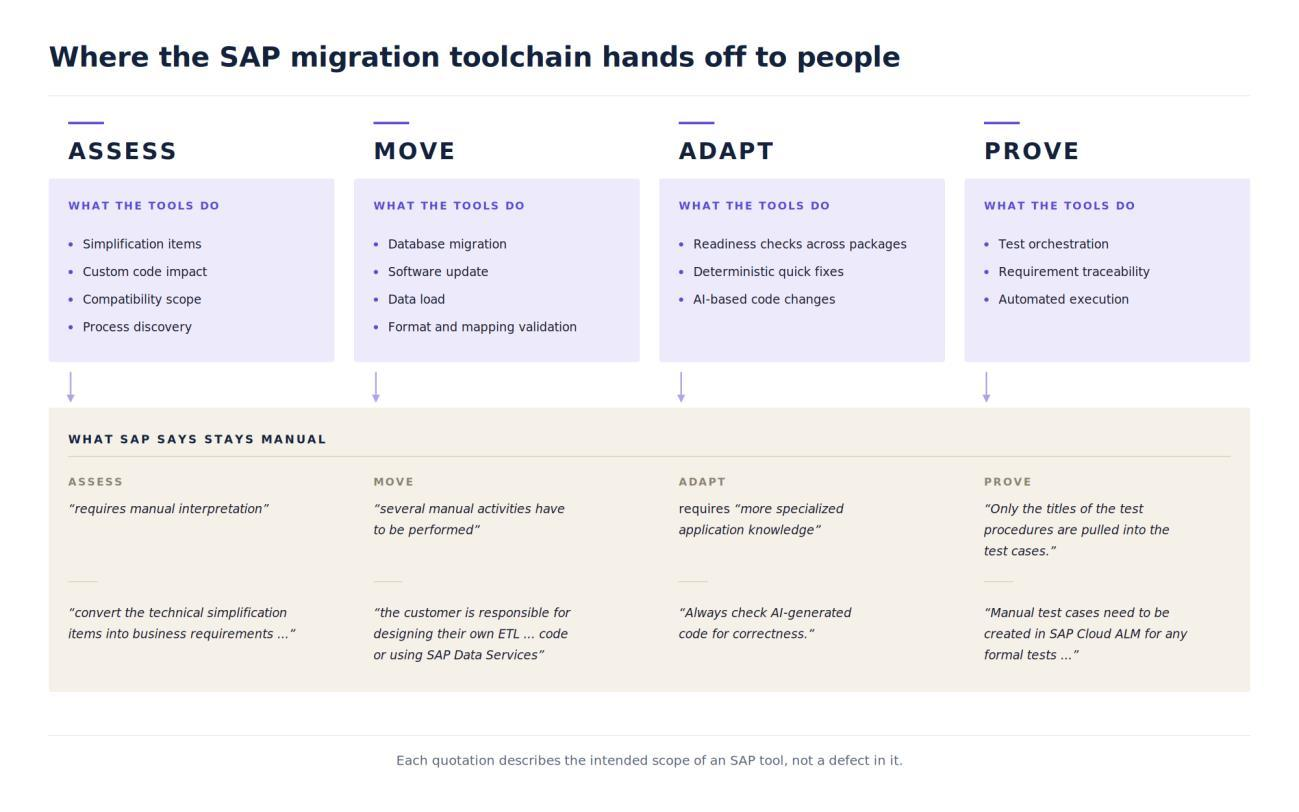
Every line below is SAP's own wording about where its tooling deliberately hands back to the customer. These are not gaps. They are the points where SAP has scoped a decision as the customer's to make, and each one carries an effort line in your plan.
| The work that stays manual | SAP's own words | Layer |
|---|---|---|
| Turning findings into scope | "requires manual interpretation" | Assess |
| Authoring the requirement | "convert the technical simplification items into business requirements together with your SAP contact" | Assess |
| Everything after the technical move | "several manual activities have to be performed" | Move |
| The data transformation logic | "the customer is responsible for designing their own ETL ... code or using SAP Data Services" | Move |
| Judging the non-mechanical code | requires "more specialized application knowledge" | Adapt |
| Checking what the AI wrote | "Always check AI-generated code for correctness." | Adapt |
| Writing the actual test script | "Only the titles of the test procedures are pulled into the test cases." | Prove |
| Testing anything customised | "the corresponding test automate must be updated" | Prove |
| Formal documentation | "Manual test cases need to be created in SAP Cloud ALM for any formal tests ..." | Prove |
Signing off that content is not the same as drafting it from scratch, and the gap between those two is where most of the capacity goes.
Why the 2027 Deadline Turns This Into a Capacity Problem
That layer is people-shaped, which is why the deadline behaves the way it does. SAP publishes the date. It does not publish a duration. For heavily customised estates, delivery capacity can become a more immediate constraint than tooling spend as the 2027 date approaches.
| Date | What SAP commits | What it means for planning |
|---|---|---|
| 31 December 2027 | Mainstream maintenance ends for SAP Business Suite 7 core applications, which include SAP ERP 6.0 | The real planning horizon |
| 2028 to 2030 | Optional extended maintenance, "available for three years from beginning of 2028 until end of 2030" | SAP prices it at "a premium of two percent points on the maintenance basis" |
| After extended maintenance | "customer specific maintenance for their SAP Business Suite 7 applications" | Priced and scoped per customer |
| Through 2040 | "there will always be at least one release of SAP S/4HANA in maintenance" | The target is committed long term |
Dates and quotations from SAP's maintenance strategy for SAP Business Suite 7 and SAP S/4HANA, which prices the extension at "a premium of two percent points on the maintenance basis". SAP set these dates in its February 2020 policy update, so they have been stable for six years.
Against that fixed date, SAP does not publish a single universal duration for an ECC to S/4HANA migration. What it does publish is estimation tooling with stated limits: the Planned Downtime Calculator is "intended for a first estimation without any existing data from a run".
So plan against a different number: how much fifth-layer work you can clear before December 2027.
How to Sequence Your Migration Toolchain
This is the order we run them in.
1. Start usage logging this month. Logging cannot be backdated, but it can be started: begin now and you still capture a full year-end close before the 2027 date. 2. Baseline the estate. Run SAP Readiness Check against production and the Custom Code Migration app alongside it, so the simplification items and the custom code findings arrive together. 3. Run the Simplification Item Check early. Its errors have to clear before Software Update Manager can enter downtime.
4. Decide the transition path before you buy anything. The three paths use different tools, and the choice sets your whole toolchain. 5. Run code analysis against ECC, and adaptation in a converted environment. Adaptation needs an S/4HANA target, which a sandbox or development system can provide ahead of the production move. 6. Design the custom test cases in parallel. Everything you customised needs cases somebody has to write, so start them alongside the build.
Every one of those steps produces a document, a specification or a decision record. Most of the planning and preparation can begin before the production conversion, and actual code adaptation needs access to a converted S/4HANA environment, which is why the first months of a wave plan are usually the cheapest to get right.
How We Close the Fifth Layer
SAP's tools handle the technical migration well. SASA, our SAP AI SDLC Assist platform, addresses the cross-tool authoring and delivery workload around specifications, code, testing and evidence, and it works across all four of the other layers. It reads the landscape, drafts the functional and technical specifications behind the scope decisions, writes clean-core-aligned ABAP against those specifications during code adaptation, and generates the test cases from the same specifications, so the traceability SAP Cloud ALM offers has something to trace back to. It deploys inside your own SAP landscape, so your data is processed in the environment you already control. SASA is listed on SAP's partner catalogue.
Based on AiFA Labs' internal engagement measurements, we have recorded up to 30% less time creating functional design specifications, a similar reduction on manual test documentation, and up to 50% less ABAP development time. These are our own figures rather than independently audited benchmarks, and results vary with the size and condition of the custom estate.
SASA works alongside Software Update Manager and the SAP S/4HANA Migration Cockpit, which move the system and the data, and alongside your architects and process owners, who keep the scope and design calls. What it removes is the drafting load underneath them: the specification, documentation and test-authoring effort the toolchain leaves behind. That is the effort the 2027 date squeezes hardest.
Request an S/4HANA Toolchain Assessment
If you are scoping a wave plan now, the number worth having first is how many of your custom objects and processes will need a specification written by hand. Request an S/4HANA toolchain assessment and we will map your estate against the five layers and give you a scoped range for that number, with the assumptions written down alongside it.
About the Author

Frequently Asked Questions
References
- SAP. Maintenance strategy for SAP Business Suite 7 and SAP S/4HANA: innovation commitment until 2040. SAP Support Portal, accessed September 2026.
- Galer, Susan. Updated Policy Gives Customers More Time to Complete SAP S/4HANA Transition. SAP News Center, 11 February 2020.
- SAP. SAP Readiness Check. SAP Community topic page, accessed September 2026.
- SAP. Exploring the SAP S/4HANA Conversion. SAP Learning, accessed September 2026.
- SAP. Performing System Preparation Activities for System Conversions. SAP Learning, accessed September 2026.
- SAP. Collecting Usage Data for Custom Code. SAP Learning, accessed September 2026.
- SAP. Using Integrated Toolchain across SAP Activate for System Conversion. SAP Learning, accessed September 2026.
- SAP. Describing the Customer Transition Paths to SAP S/4HANA Cloud Private Edition. SAP Learning, accessed September 2026.
- SAP. Selective Data Transition Engagement. SAP Support Portal, accessed September 2026.
- SAP. Software Update Manager. SAP Support Portal, accessed September 2026.
- SAP. Performing Manual Follow-On Activities for an SAP S/4HANA Conversion. SAP Learning, accessed September 2026.
- SAP. Introducing the SAP S/4HANA Migration Cockpit. SAP Learning, accessed September 2026.
- SAP. Migrating Data to SAP S/4HANA Cloud Private Edition. SAP Learning, accessed September 2026.
- SAP. Discovering the Workstreams. SAP Learning, accessed September 2026.
- SAP. SAP Discovery in SAP LeanIX. SAP Help Portal, accessed September 2026.
- SAP. Learning SAP Signavio Process Insights. SAP Learning, accessed September 2026.
- SAP. SAP Business AI: Release Highlights Q2 2026. SAP News Center, 20 July 2026.
- Lienard, Sonja. How Joule for Developers and ABAP AI Capabilities Transform the Developer Experience. SAP News Center, 9 July 2025.
- SAP. Adapting Custom Code. SAP Learning, accessed September 2026.
- SAP. Amplifying ABAP Development with AI. SAP Learning, accessed September 2026.
- SAP. SAP Test Management, SAP Cloud ALM for Implementation Expert Portal. SAP Support Portal, accessed September 2026.
- SAP. Preparing Test Plans in SAP Cloud ALM. SAP Learning, accessed September 2026.
- SAP. Introducing the Test Automation Tool. SAP Learning, accessed September 2026.
- SAP. Explaining the Test Strategy, SAP S/4HANA Cloud Private Edition. SAP Learning, accessed September 2026.
- SAP. Deciding on Appropriate Approach, Minimizing Downtime of System Conversion. SAP Learning, accessed September 2026.
- SAP. AIFA LABS LLC: Cerebro SASA, AI platform for SAP SDLC automation. SAP partner listing, accessed September 2026.
- AiFA Labs. ABAP AI in 2026: A Practical Tool Comparison for S/4HANA Teams. aifalabs.com, accessed September 2026.
- AiFA Labs. SASA Features. sasa.aifalabs.com, accessed September 2026.
- AiFA Labs. Sagar Chakraborty, author profile. AI Knowledge Hub, accessed September 2026.
Comments