.svg)
 Book a Demo
For MuleSoft sources, SAP's native Migration Assessment and migration tooling do not provide a direct artifact-conversion path. As of September 2026 both are documented for SAP Process Orchestration as the source. In practice, MuleSoft integration logic has to be re-expressed natively in SAP Integration Suite, with the analysis, mapping, design and generation work accelerated through services or partner tooling rather than through an SAP-native converter. That boundary decides the budget, because the inventory and the effort model have to come from somewhere other than an SAP tool. We run these migrations at AiFA Labs, and this is the point where most programmes' early estimates go wrong. This guide is written for the people who own that decision: SAP program directors, enterprise and integration architects, integration leads, and delivery leads at system integrators. It covers why the decision is landing now, exactly where SAP's tooling boundary sits, what closes that gap, what has to be rebuilt construct by construct, how to hold delivery guarantees through the move, and how to decide whether consolidation is right for your estate at all.
Key Takeaways
- SAP publishes no native artifact-conversion path from MuleSoft, so the effort concentrates in re-expressing integration logic on SAP Integration Suite rather than converting it.
- SAP's Migration Assessment is documented for SAP Process Orchestration sources at releases 7.31 SP28, 7.40 SP23 and 7.50 SP06 and above, which is the clearest sign it is scoped to that one source system.
- SAP mainstream maintenance for Business Suite 7 ends at the end of 2027, with optional extended maintenance until the end of 2030, and SAP NetWeaver 7.5 follows the same timeline.
- Among the eight organisations in SAP's 2026 IDC Business Value study, 82% of integrations touched at least one non-SAP application, which reinforces designing for a heterogeneous estate.
- Build the interface inventory and pattern catalogue before committing a wave plan, because the effort model for a third-party source has to be produced rather than generated.
What Does a MuleSoft to SAP BTP Migration Actually Involve?
It involves rebuilding integration logic natively on SAP Integration Suite, the integration service that runs on SAP Business Technology Platform, and retiring the equivalent logic on the platform you are leaving. Three separate things get conflated under the same heading, and separating them is the first useful thing an architect can do.
Start with the runtime: where messages are processed, how that scales, and whether any of it has to stay inside your own network.
Underneath that sits the integration logic itself. The flows, the transformations, the routing, the error handling, the delivery guarantees. This is where the effort lives, and it carries your business rules.
Then there is the API layer: the proxies, the policies, the contracts your consumers already depend on. This layer can often be insulated from the rest of the work.
SAP Integration Suite is a full integration platform as a service, with its own runtime, API gateway, event layer and prepackaged content. SAP describes it as a way to "Consolidate tools with one comprehensive platform that unifies all applications, data, and processes across any environment", and consolidation is the honest word for what most of these programmes are. No vendor deadline forces the move off the platform you are leaving, which is why this decision keeps getting deferred. The cost is not a shutdown date. It is that a second integration estate keeps drawing licence, monitoring and specialist skills for every year the decision waits, and every interface the S/4HANA programme rebuilds in the meantime is rebuilt onto the estate you meant to leave.
Why SAP-Centric Estates Are Consolidating Integration Now
Because the SAP core deadline reopens the interface layer anyway, and because clean core changed where SAP says extension and integration logic should live. Three drivers are pushing the same decision to the same place, and only one of them is about integration platforms at all.
The 2027 Maintenance Deadline Reopens the Interface Layer
SAP provides mainstream maintenance for SAP Business Suite 7 core applications until the end of 2027. Optional extended maintenance runs three more years, from 2028 through 2030, at a premium of two percent points on the maintenance basis. That extension buys support for the core. It does not remove the need to reassess and, where necessary, remediate interfaces as part of the S/4HANA move. SAP NetWeaver 7.5, the stack that carries SAP Process Orchestration, follows the same timeline.
This matters even for an estate with no SAP Process Orchestration in it. An ECC to S/4HANA programme forces teams to reassess the interfaces into and out of the SAP core. Some may carry over with little material change, while others need work on fields, APIs, data models or the integration logic itself. That creates a natural decision point: if an interface needs work anyway, which platform should own it going forward? When a team rebuilds an interface on the platform it already has, it has answered that question by default. That rebuild effort is committed either way. The open question is which platform it lands on, and deciding deliberately is what turns a funded rebuild into a consolidated estate instead of a preserved one.
Clean Core Moves Integration Logic to a Sanctioned Place
SAP defines clean core as "a set of guiding principles that support continuous business transformation by designing agile, innovative and efficient ERP systems", and its guidance on placement is direct: "Instead of modifying the ERP core, use SAP BTP to build custom applications and integrations that sit alongside the core system". Since 2025, SAP has classified extensions into four compliance levels.
| Clean core level | How SAP describes it |
|---|---|
| Level A: Extend with SAP Build | Fully compliant extensions using only publicly released and stable SAP interfaces, backed by formal stability contracts |
| Level B: Leverage classic APIs | Compliant extensions that, in addition to meeting level A criteria, also use SAP's classic APIs and technologies |
| Level C: Accesses internal objects | Partially compliant extensions allowing access to SAP internal objects, offering flexibility for legacy scenarios |
| Level D: Not recommended extensions | Extensions not considered clean, using explicitly non-recommended objects or techniques, which SAP says represent the highest risk and create significant technical debt |
Source: SAP, How to Extend SAP S/4HANA Cloud the Right Way, August 2025.
Note the precise claim. SAP names SAP BTP as the platform for side-by-side extensibility, describing it as "creating scalable, decoupled applications that run independently from the core". SAP Integration Suite is a BTP service, so integration built there sits inside the sanctioned model. That is a placement argument rather than a compliance guarantee, and a placement argument is what an architecture board can act on, because SAP has said in writing where integration logic belongs. BTP placement supports a clean core architecture, and compliance still depends on the interfaces, APIs and design patterns used to reach the SAP core, which is why SAP ties the compliant levels to released and stable interfaces.
Most Integration Is Not SAP to SAP, Which Is an Argument for Consolidating
The usual argument for keeping a vendor-neutral platform is that most integration is not SAP to SAP, and the share is real. In the Business Value white paper SAP commissioned from IDC in August 2026, based on interviews with eight organisations already running SAP Integration Suite, "on average, 64% of integrated applications in the study are non-SAP" and "82% of integrations touch at least one non-SAP application".
We read it the other way, and the reason is scope. SAP positions Integration Suite to "Integrate your business across SAP and third-party landscapes", with over 160 prebuilt connectors to some of the most popular third-party applications alongside its native SAP semantics. If the non-SAP share were a reason to keep integration off SAP BTP, it would be a reason to keep it off any single platform. In an SAP-centric estate, Integration Suite is a strong consolidation candidate because of its SAP semantics, prebuilt content, BTP alignment and hybrid deployment options. Whether that is the right trade for your estate depends on a short set of criteria, which the closing section works through.
Does SAP Provide Migration Tooling for a MuleSoft Source?
Not in the automated sense, and this is one of the most consequential assumptions in a migration business case. As of September 2026, SAP's Migration Assessment application is documented for SAP Process Orchestration as the source: SAP describes the application as one that "automatically assess the SAP Process Orchestration scenarios you want to migrate to SAP Integration Suite". For a third-party integration platform, SAP's published route is a services engagement: "Use SAP Services and Support to migrate to SAP Integration Suite from SAP Process Orchestration; SAP BTP, Neo environment; or third-party integration solutions". One is self-service tooling and the other is a guided services engagement, and knowing which applies to your source changes how you scope the business case.
For a team leaving SAP Process Orchestration, Migration Assessment is genuinely good. It extracts scenarios from the source system and sorts each one into "Ready to migrate," "Adjustment required," or "Evaluation required". It estimates effort with T-shirt sizing from small to extra large, analyses sender and receiver adapters, and exports the results to Excel and PDF, surfacing "migration status, migration showstoppers, and possible workarounds" for the team to evaluate. It has a documented 2 GB limit on data extraction.
The version gates are what settle the question. SAP states that "migration is currently supported for the following versions of SAP Process Orchestration: 7.31 SP28 and above, 7.40 SP23 and above, 7.50 SP06 and above". Those are support package levels of one specific SAP product. A tool scoped that precisely was built to read one source, and it reads it well.
Even inside that supported path, some work stays manual. SAP's migration tooling copies mapping objects such as message mapping and XSLT mapping into the generated integration flow, imports dependent resources including function libraries, message and data types and WSDL files, and externalises the supported adapters. It does not carry across adapter-specific configuration, since SAP instructs the user to configure the address and the proxy type afterwards, and it does not carry across security artefacts, since SAP instructs the user to "Check if the security artifacts, like credential name and key alias... are correctly configured". SAP's native path therefore still requires explicit configuration and validation of security artefacts and adapter-specific settings. For a third-party migration, the delivery approach should identify which configuration elements can be transferred or generated automatically and which need controlled re-entry with architect validation.
| Migration stage | SAP Process Orchestration source | Third-party source, SAP tooling | Third-party source, with AiFA Labs |
|---|---|---|---|
| Interface inventory | Extracted automatically from the source system | Not covered | AI-led analysis of flows, specifications and dependencies |
| Assessment and classification | Automated, three categories | Not covered | Pattern catalogue drives the classification |
| Effort estimate | Automated, T-shirt sizing per scenario | Not covered | Effort model derived from pattern counts |
| Artifact conversion | Semi-automated for mappings, resources and adapters | Not covered | Generated iFlow templates, architect reviewed |
| Security material and adapter configuration | Manual | Manual | Controlled migration or re-entry with validation, with the degree of automation depending on the source, target adapter and security model |
| Supported route | Migration Assessment plus migration tooling | SAP Services and Support engagement | AiFA Labs, SAP PartnerEdge partner, listed on SAP Store |
One SAP capability does carry across, and most programmes miss it. Integration Assessment implements SAP's Integration Solution Advisory Methodology, and SAP states that ISA-M "includes a technology-agnostic framework for defining and executing an integration strategy", adding that "you can also apply the concepts to integration technologies from other vendors". So while SAP's native Migration Assessment does not inventory or assess a MuleSoft source estate, the method for defining the target estate is available, supported, and designed for exactly this. SAP documents it as guiding users through the interface request process and proposing the technology that fits the organisation's context, which is how a team stops the new estate from accumulating the same sprawl as the old one.
SAP also offers a free migration assessment that it describes as providing "a personalized migration plan, a one-hour presentation of assessment results". SAP's public page does not state that its native Migration Assessment application inventories a MuleSoft estate or generates a MuleSoft-specific effort model.
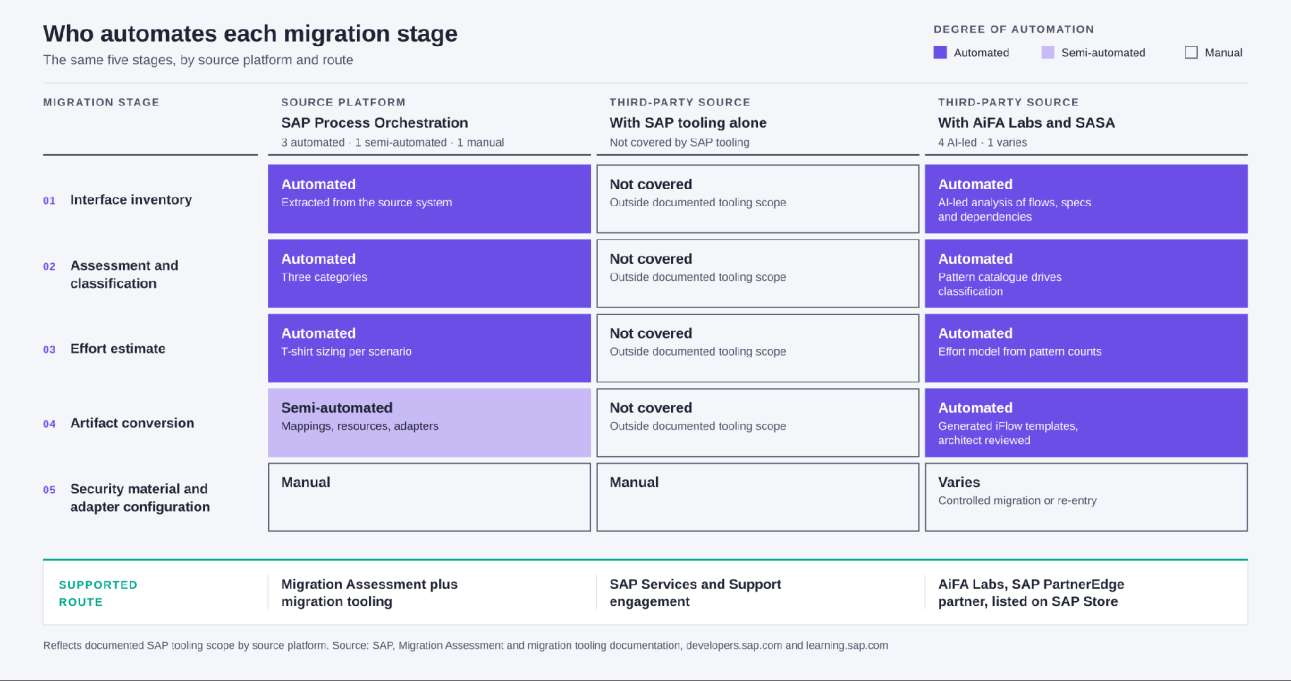
That gap is not a reason to stay where you are. It is the part of the programme that has to be built rather than bought from SAP, and the next section covers what closes it.
How AI Closes the Gap SAP's Tooling Leaves
The migration work is patterned and repetitive. The same flow shapes recur across an estate, the same transformations reappear with different field names, and the same adapter decisions get made again and again. That repetition is exactly what SAP's tooling does not cover for a third-party source, and it is what we built SASA to handle.
SASA is our AI platform for the SAP delivery lifecycle, and it takes on the analysis and drafting work that otherwise gets done by hand. It performs AI-led analysis of Mule flows, RAML specifications, transformations and orchestration logic, then automated impact analysis and dependency mapping across APIs, connectors and downstream systems, which is how the interface inventory and the pattern catalogue get built. From there it produces automated recommendations for SAP Best Practice aligned iFlow designs and generates reusable iFlow templates based on recurring integration patterns, so a pattern is built once and applied across every instance, instead of a hundred separate builds. It also handles TDS creation, iFlow generation, mapping creation and test scenario recommendations.
The SASA platform is listed on SAP Store, and AiFA Labs is a partner in the SAP PartnerEdge program. Our own delivery records include a programme in which 120 interfaces were migrated with 35% cost savings on a MuleSoft to SAP BTP Integration Suite engagement, using the SASA Migration Assistant to analyse, map and support the migration. For regulated and high-complexity integrations, where less of the work collapses into repeating patterns, our published planning benchmark is up to 25% migration effort savings. Results depend on the source estate, its complexity and how much of it reuses common patterns.
None of this is autonomous, and we would not want it to be. Our delivery process requires architect review and approval of generated designs, mappings and test cases before acceptance. Reviewing a draft that already follows an approved pattern is a shorter task than authoring one from a blank page, and that difference is where the saving comes from. The judgment calls stay with the people who make them today.
What You Get in Return on SAP Integration Suite
A full integration platform with a documented hybrid runtime, prepackaged content, and native understanding of SAP data. Two things matter most to the reader who has to sign off the architecture.
The Capabilities That Replace What You Are Leaving
SAP documents the capability set in one place, and most of it maps onto work your estate already does. Cloud Integration is the flow runtime, connecting SAP and non-SAP applications across cloud and on-premise landscapes through messages. API Management is where the policy layer goes, shipping over 40 out-of-the-box policies for security, traffic management and mediation. Open Connectors picks up the long tail, with over 160 prebuilt connectors to some of the most popular third-party applications. Integration Advisor brings machine learning and a crowd-sourced knowledge base to the mapping work itself. Event-driven messaging is handled with SAP Event Mesh or SAP Integration Suite, advanced event mesh, depending on volume, topology, deployment and event-management requirements. Worth knowing for a licensing conversation: SAP documents both as standalone SAP BTP services rather than capabilities of Integration Suite itself, despite the advanced event mesh naming. Two SAP-native capabilities can add value beyond a like-for-like migration: API Composition, which builds curated business data graphs so applications and agents reach data across systems through one unified API, and Trading Partner Management, which carries B2B partner agreements natively.
How Edge Integration Cell Can Address Data Residency and Local Execution
Edge Integration Cell is the option that changes most data residency conversations in regulated industries, and it is under-discussed. SAP describes it as "a hybrid integration runtime offered as an optional extension to the SAP Integration Suite", letting teams design and monitor integration content in the cloud while running it inside their own managed private landscape.
The security posture is the part worth reading closely. SAP's reference architecture states that "The EIC runtime communicates with SAP BTP over secure, outbound-only channels, avoiding any inbound exposure to the public internet" and that "Data never leaves the corporate network unless explicitly allowed". SAP positions it explicitly for compliance and for latency, saying it "Supports data residency and localization laws, especially in countries where SAP BTP is not available or not approved for regulated workloads" and that deploying the runtime close to the source systems delivers "low-latency integration between critical systems like SAP S/4HANA and manufacturing systems".
You build once for both. SAP states the model "allows deployment of the same iFlow with different configurations in Integration Suite and EIC to suit business needs". For a manufacturer with plant-floor integrations that cannot leave the site, or a bank with data that cannot leave the jurisdiction, that can remove a major barrier to consolidation, subject to the organisation's own regulatory, security and operational requirements.
What Actually Has to Be Rebuilt, Construct by Construct
A flow and an integration flow both orchestrate steps, but they do not decompose the same way. So the useful question for each construct is not whether it converts. It is whether the pattern survives.
| What you have today capability or pattern | Typical SAP Integration Suite target | Nature of the work |
|---|---|---|
| Mule application and flow | Integration flow (iFlow) in Cloud Integration | Re-design. Different component palette and execution model |
| DataWeave transformation | Message mapping, XSLT mapping, or a Groovy or JavaScript step | Re-design. Transformation logic is re-expressed, not ported |
| Anypoint connectors | Cloud Integration adapters, plus Open Connectors for third-party SaaS | Like-for-like where a native adapter exists, re-design where it does not |
| API Manager policies | SAP API Management policies on an API proxy | Rebuild. Both apply named declarative policies at a gateway |
| Anypoint Exchange reusable assets | SAP Business Accelerator Hub for SAP-provided content, plus Integration Suite packages and an internally governed catalogue for your own reusable assets | Partly replaced by prepackaged content, partly a governance decision |
| RAML or OAS API specifications | API proxies in SAP API Management, described by an OpenAPI specification | Rebuild for OAS. RAML-only constructs need a specification redesign |
| CloudHub runtime plane | Cloud Integration runtime on SAP BTP, or Edge Integration Cell | Re-design. Placement becomes an explicit architecture decision |
| Anypoint MQ, queues and message exchanges | JMS queues for integration-flow decoupling, or SAP Event Mesh or advanced event mesh for event-broker and pub/sub scenarios | Re-design. The target depends on whether the pattern is decoupling or eventing |
| Runtime monitoring and dependency views | Cloud Integration message monitoring plus SAP Cloud ALM | Re-design. Dashboards and alert rules are rebuilt, not migrated |
| Secure configuration properties | SAP security material, covering user credentials, OAuth2 credentials and secure parameters, plus the tenant keystore for certificates and key pairs | Re-design and re-entry. Map each source secret or alias to the right SAP artefact and validate it |
| Build-and-deploy pipeline | SAP Content Agent with SAP Cloud Transport Management | Re-design. Different artifact format and promotion model |
| Reconnection strategies and the Until Successful scope | Exception subprocess, built-in retry, JMS queues | Re-design. Conceptually parallel, structurally different |
Five things need an explicit decision rather than a mapping. Expression logic becomes a case-by-case choice between a simple expression, a script and a mapping function. Dependency visibility has to be designed deliberately rather than inferred from traffic. Runtime sizing becomes the placement decision described above, between the shared cloud runtime and Edge Integration Cell. Cataloguing your own internally authored iFlow templates is a governance decision your team owns, separate from SAP's prepackaged content. And specification constructs that exist only in RAML need the specification itself redesigned, not converted.
We flag these five early on every engagement, because they are the ones that surface late as scope surprises when nobody has assigned them an owner.
How to Keep Delivery Guarantees and Governance Intact
Reliability parity can be designed and verified for the delivery behaviours most production interfaces depend on, because SAP Integration Suite has a named construct for each of them. The migration plan should map each source behaviour to the appropriate construct and prove that behaviour before cutover.
Where the selected protocol and integration pattern support it, delivery behaviour is set explicitly through quality of service, at Exactly Once or Exactly Once In Order where sequence matters too. Failure handling belongs in an exception subprocess, an additional subprocess defined inside the integration flow and invoked when an unexpected error occurs, which is what keeps a technical failure such as a lost connection or a script error from terminating the flow. Unattended recovery comes from the built-in retry mechanism, with manual resubmission as the backstop. Decoupling and persistence come from JMS queues, and for state that has to survive between steps or between runs SAP publishes direct guidance on choosing between the data store, variables and JMS queues. The mapping below pairs each delivery behaviour with the construct that answers it.
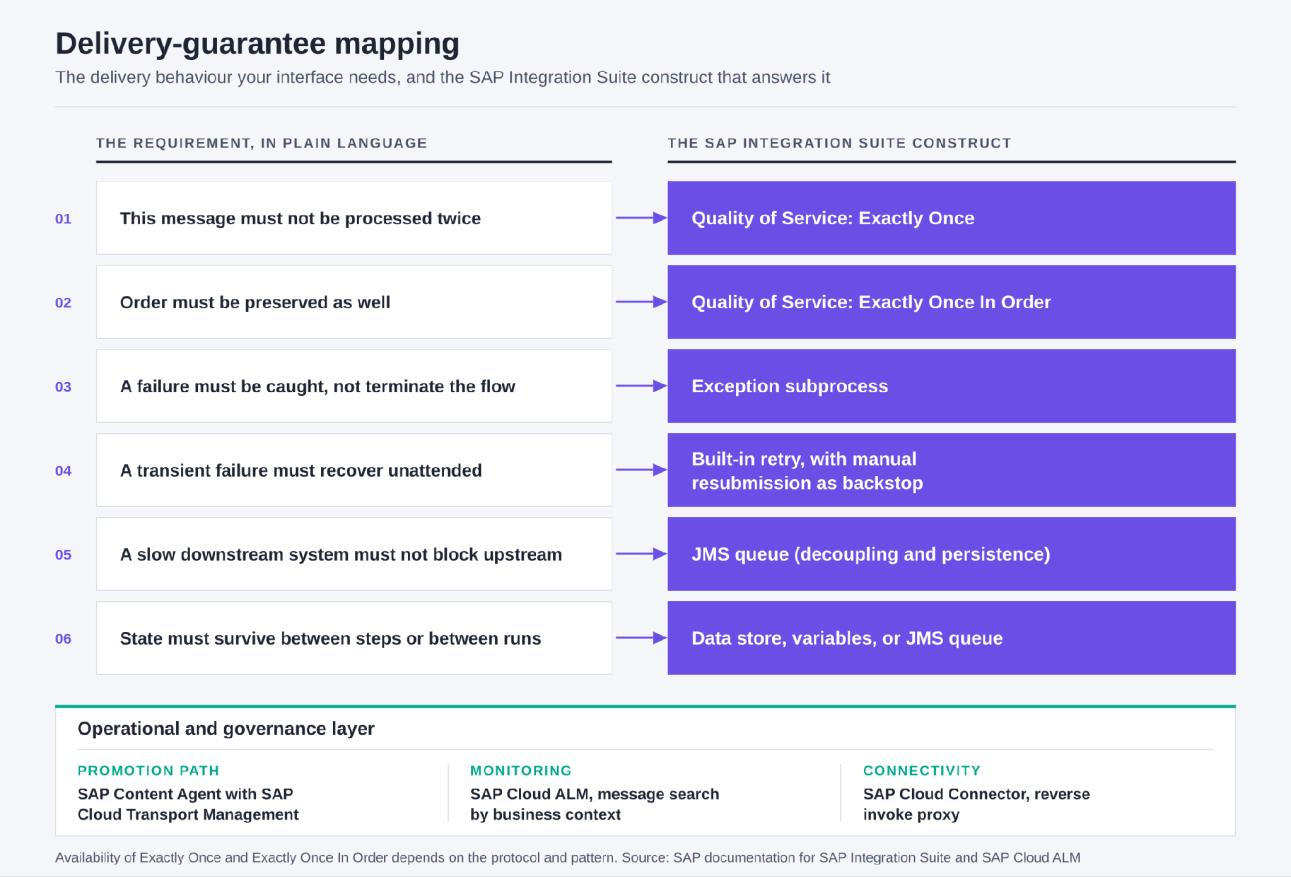
Governance follows the same pattern. Content moves between tenants through SAP Content Agent, which assembles and exports the integration content, and SAP Cloud Transport Management, which models the transport landscape and executes the transports, which gives you a promotion path with an audit trail rather than a deployment script. Operationally, SAP Cloud ALM correlates integration artefacts so that "the correlation of integration artifacts provides end-to-end visibility in interface calls and message flows cross all involved cloud services and systems", with alerting on failed messages or exceptions and a message search by business context, an order number for instance, across every component it touched during execution. That last capability is the one that shortens an audit conversation, because it answers a question in the auditor's language rather than in the platform's.
For financial entities in scope of the EU's Digital Operational Resilience Act, which applies from 17 January 2025, ICT third-party concentration risk can form part of the platform decision. Article 29 requires financial entities, when considering ICT services supporting critical or important functions, to assess whether a provider is not easily substitutable and whether multiple arrangements exist with the same or closely connected ICT third-party providers. That assessment is owed on the estate you run today as much as on the one you move to, and a two-platform estate has its own concentration and operational profile to document. We produce the evidence pack that supports it as a fixed deliverable of the target-design phase set out below, and your compliance function makes the determination. This is general information and not legal advice.
For connectivity back into systems that stay where they are, SAP Cloud Connector "acts as a reverse invoke proxy between on-premise networks and SAP cloud platforms" and "enables secure connectivity without firewall configuration changes", with transport-level security, message-level security and principal propagation available on top.
Two Decisions to Make Before the Business Case Is Signed
A platform migration changes where integration runs. Two decisions sit alongside it, and both are cheaper to make now than after the first wave ships.
Decide what you are retiring, not just what you are moving. An interface that is hard to maintain today will be just as hard to maintain afterwards if it is rebuilt exactly as it was. Migration is the best opportunity you will get to simplify, and the triage step in the roadmap below is where that opportunity is either taken or spent replicating. Deciding the disposition list early is what turns the rebuild into a smaller estate rather than the same estate in a new place.
Decide who owns the catalogue afterwards. A new platform does not by itself answer the ownership and cataloguing questions that most estates have never had a business reason to formalise. Those come out of the target-design phase below, and they hold only if someone is accountable for them once the programme closes. We build the technology mapping and the governance model as a deliverable for exactly that reason.
The judgment does not migrate either way. Specifications, flows and tests can be drafted quickly, and deciding what an interface should do, then accepting that it is right, stays with your architects.
A Migration Roadmap for a Third-Party Source
Because SAP's native Migration Assessment does not automatically assess a third-party source estate, the programme has to produce its own inventory and its own effort model before any wave plan is credible. Five phases, each one defined by what it produces.
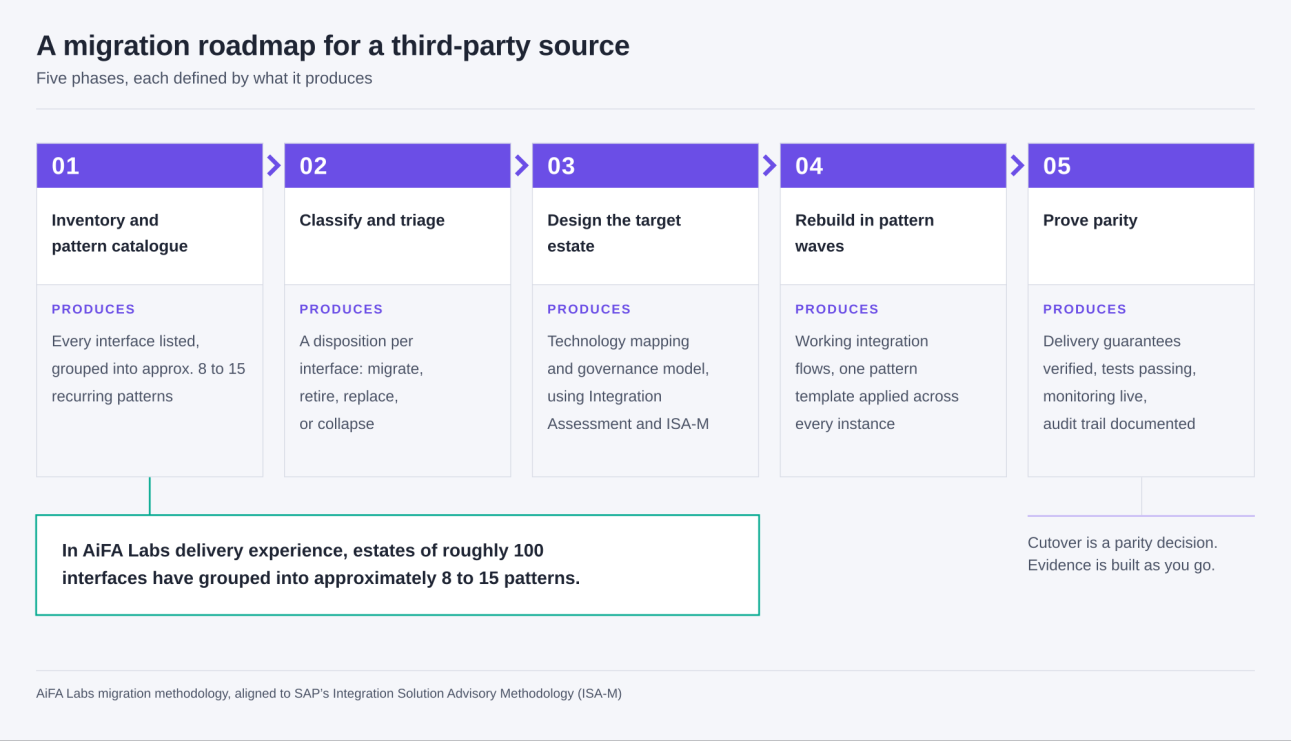
Phase 1, Build the Interface Inventory and the Pattern Catalogue
Produce a list of every interface, what it does, what it touches, and which recurring pattern it belongs to. The pattern catalogue is the deliverable that makes everything downstream estimable. In AiFA Labs delivery experience, estates of roughly a hundred interfaces have grouped into approximately eight to fifteen recurring patterns. The actual pattern count is one of the first things an interface assessment establishes, and it is what turns an estimate from a judgement call into a count.
Phase 2, Classify and Triage Before You Estimate
Produce a disposition for each interface: migrate, retire, replace with prepackaged SAP content, or collapse into a shared pattern. Not everything moves. Most estates of any age carry interfaces that have gone quiet and duplicates that exist because two teams solved the same problem in parallel. Finding them is the cheapest saving in the programme, and classifying before estimating is what keeps you from paying to rebuild work you should be deleting.
Phase 3, Design the Target Estate With Integration Assessment
The output here is the technology mapping and the governance model. Use ISA-M, which SAP states can be applied to integration technologies from other vendors, and the Integration Assessment capability that implements it, to define your integration styles and domains and to decide which technology a new interface request should get. Deadline pressure squeezes this phase first, which is why we carry it as a fixed deliverable rather than an optional one. Holding it is what keeps a fresh estate from acquiring the sprawl of the old one.
Phase 4, Rebuild in Pattern Waves
Produce working integration flows, one pattern at a time. Build the template for a pattern once, review it properly, then apply it across every instance. Where the placement decision favours a private landscape, the same flow deploys to Edge Integration Cell, so there is no second design to maintain.
Phase 5, Prove Parity Before Cutover
By the end of this phase you hold the evidence. Quality-of-service settings verified against the original behaviour, generated test cases executed and passing, monitoring and alerting live, the transport path established, and the audit trail documented. Assembling that during the build, rather than reconstructing it the week before go-live, reduces cutover risk and last-minute evidence gaps.
How to Decide Whether Consolidation Is Right for Your Estate
Consolidation is not automatically the right answer, and the analysis that decides it is short. Weigh how much of your integration volume touches the SAP core, since that is where native semantics and prepackaged content pay back fastest, and weigh the non-SAP workloads that would move with it. Look at your API and event requirements, because a heavy event-broker estate and a heavy request-response estate point at different target capabilities. Then look at the practical constraints: existing contract terms and their renewal dates, the skills your team already has, and the operating model you want to run afterwards.
Where SAP is the system of record and most integration volume touches it, consolidating onto SAP Integration Suite usually pays back through native semantics, prepackaged content, clean core alignment and hybrid deployment. Where a large share of integration is unrelated to SAP, or where a specialist event or API platform is already delivering, a mixed estate with clear ownership boundaries can be the better architecture. The point of an interface assessment is to answer that from your own data rather than from a vendor's default.
Start With an Integration Assessment
The gap this article describes has a concrete first step: the source-side deliverable SAP's native Migration Assessment does not produce for MuleSoft. We map your existing interfaces, group them into patterns, and build the effort model from the pattern counts, so your wave plan reflects your own estate rather than a generic timeline. You get the interface inventory, the pattern catalogue, the disposition list and a phased plan you can take to a steering committee.
Request a migration assessment and we will show you where the effort is likely to sit in your estate.
About the Author

Frequently Asked Questions
References
- SAP. Maintenance strategy for SAP Business Suite 7 and SAP S/4HANA. SAP Support Portal.
- SAP. SAP NetWeaver 7.5 maintenance strategy (including SAP Process Integration and SAP Process Orchestration 7.5). SAP Community Topics.
- SAP. What is a clean core? sap.com.
- SAP. How to Extend SAP S/4HANA Cloud the Right Way: Clean Core Extensibility Compliance Levels A to D. SAP News Center, August 2025.
- SAP. SAP Integration Suite: integration platform as a service. sap.com.
- SAP. Open Connectors: prebuilt connectors to third-party applications. sap.com.
- SAP. SAP Process Orchestration to SAP Integration Suite Migration, SAP BTP Transformation Program. sap.com.
- SAP. Use the Migration Assessment Application. SAP Developer Tutorials.
- SAP. Use the Migration Tooling. SAP Developer Tutorials.
- SAP. Using Migration Assessment Tools (supported SAP Process Orchestration releases). SAP Learning.
- SAP. What Is Integration Assessment. SAP Help Portal.
- SAP. Understanding the SAP Integration Solution Advisory Methodology (ISA-M). SAP Learning.
- SAP. Exploring SAP Integration Suite. SAP Learning.
- SAP. Exploring API Management, Event Mesh, and Cloud Integration. SAP Learning.
- SAP. Message Mapping. SAP Help Portal.
- SAP. Create XSLT Mapping. SAP Help Portal.
- SAP. What Is API Composition? SAP Help Portal.
- SAP. Exploring Secure Connectivity in SAP BTP (SAP Cloud Connector). SAP Learning.
- SAP. Integration and Exception Monitoring, SAP Cloud ALM Expert Portal. SAP Support Portal.
- SAP. Edge Integration Cell on Hyperscalers, reference architecture. SAP Architecture Center.
- SAP. Migrating from SAP Process Integration and Process Orchestration to SAP Integration Suite, reference architecture. SAP Architecture Center.
- SAP. Transport SAP Integration Suite Content using SAP Cloud Transport Management Service and SAP Content Agent Service. SAP Developer Tutorials.
- SAP. Quality of Service Exactly Once. SAP Help Portal.
- SAP. Quality of Service Exactly Once In Order. SAP Help Portal.
- SAP. Define Exception Subprocess. SAP Help Portal.
- SAP. Managing Security Material. SAP Help Portal.
- SAP. Managing Keystore Entries. SAP Help Portal.
- SAP. SAP Integration Suite Handles Retry. SAP Help Portal.
- SAP. JMS Resource Limits and Optimizing their Usage. SAP Help Portal.
- SAP. Data Store, Variables, and JMS Queues: When to Use Which Option? SAP Help Portal.
- SAP. Transport Level Security, SAP Cloud Integration. SAP Help Portal.
- SAP. Apply Message-Level Security. SAP Help Portal.
- SAP. Principal Propagation. SAP Help Portal.
- SAP. What is SAP Business Accelerator Hub? SAP Help Portal.
- SAP. New IDC Business Value White Paper: SAP Integration Suite Customers Achieve 368% ROI and Eight-Month Payback. SAP News Center, 31 August 2026. Study commissioned by SAP.
- European Parliament and Council of the European Union. Regulation (EU) 2022/2554 on digital operational resilience for the financial sector (DORA), Official Journal L 333/1, 27 December 2022. EUR-Lex.
- European Securities and Markets Authority. Digital Operational Resilience Act (DORA): entry into force and application dates. ESMA.
- AiFA Labs. MuleSoft Migration use case, SASA (SAP AI SDLC Assist).
- AiFA Labs. SAP BTP services and the MuleSoft to SAP BTP Integration Suite client engagement.
- AiFA Labs. AI-Powered MuleSoft migration to SAP Integration Suite now available on SAP Store, 8 July 2025.
Source-platform documentation
- MuleSoft. DataWeave Overview. MuleSoft Documentation.
- MuleSoft. Connectors. MuleSoft Documentation.
- MuleSoft. Gateway Policies in API Manager. MuleSoft Documentation.
- MuleSoft. Anypoint Exchange Overview. MuleSoft Documentation.
- MuleSoft. Getting Started with API Designer (RAML and OAS specifications). MuleSoft Documentation.
- MuleSoft. Anypoint MQ (queues and message exchanges). MuleSoft Documentation.
- MuleSoft. Secure Configuration Properties. MuleSoft Documentation.
- MuleSoft. Flows and Subflows. MuleSoft Documentation.
- MuleSoft. CloudHub Overview. MuleSoft Documentation.
- MuleSoft. Reconnection Strategies. MuleSoft Documentation.
- MuleSoft. Until Successful Scope. MuleSoft Documentation.
- AiFA Labs. Sagar Chakraborty, author profile.
- Sagar Chakraborty, professional profile. LinkedIn.
- SAP. Cerebro SASA, AI platform for SAP SDLC automation. SAP Store partner listing.
Comments